

Biomarker tracking software built on your clinic's ranges
Set the optimal, borderline and critical bands your clinic works with, per biomarker and per sex. Every released value is graded against them, grouped by health domain and added to a trend that follows the patient for years.
15-day free trial · Unlimited patients · BAA on request
The problem
The lab's range isn't your clinic's target
The range printed on a lab report belongs to the lab. A longevity clinic usually reads results against targets of its own, and in most systems those targets live in a spreadsheet or in one provider's head. Every result then gets graded twice: once by the lab, once by hand.
LongevityEHR is biomarker tracking software that puts your ranges in the chart. Each value is graded against the band your clinic set, then kept as one more point in that patient's history.
How a value is read. The same four steps for every draw, from the report to the trend.
Values reach this path through AI lab extraction and a provider's release. Nothing is graded before your team signs off on the numbers.
Value matched
Each extracted value is matched to a biomarker your clinic tracks. A value that matches none appears in no trend and stays on its lab report, visibly unclassified.
ExampleFerritin printed on a lab report becomes a point on the patient's ferritin trend.
Graded against the clinic band
The released value is compared with your optimal, borderline and critical bands for that biomarker and, when you split it, for the patient's sex. A value with no range applied stays unclassified, never guessed.
ExampleA ferritin value is read against the Female band when your clinic splits ferritin by sex.
Placed on the trend
The value joins every earlier draw of the same biomarker. Unit spellings that mean the same thing stay on one line, and a real unit change splits the trend visibly, with the unit labeled on each segment and nothing silently converted.
ExampleFerritin reported in ng/mL and in ug/L stays on one trend line.
Snapshot kept
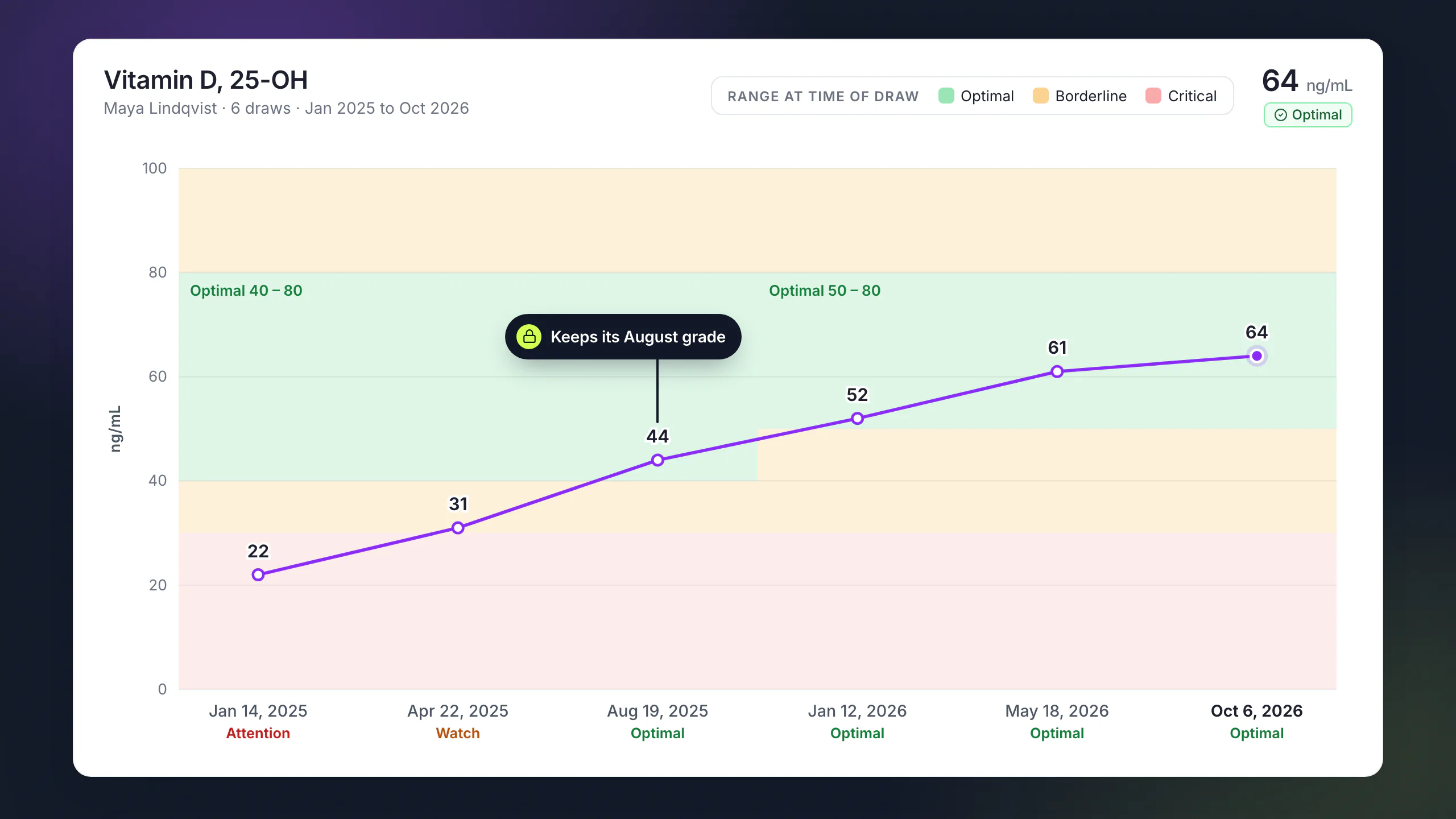
Every released value stores the range that applied on the day it was recorded. If your clinic tightens a range in October, a result from August keeps its August grade.
ExampleChanging a range on a biomarker that already has released results asks for confirmation first.
Organized by health domain
Biomarker tracking software grouped the way you read
A longevity panel is too long to read as one list. LongevityEHR sorts it into health domains and lets your clinic shape the rest.
Eight health domains
Metabolic, cardiovascular, inflammation, hormones, thyroid, organ function, nutrients and hematology, always in the same order, so a provider knows where to look.
Ranges per sex
Each biomarker carries optimal, borderline and critical bands, and any biomarker can be split into separate ranges by sex.
Your own groups
Create groups that match how your clinic reviews a panel and drag them into order. One biomarker can sit in more than one group.
A monitored set per patient
Choose the markers that matter most for each patient. Their patient portal home leads with them.
Your catalog, trimmed
Turn off biomarkers your clinic doesn't track, and ask us to add one the catalog doesn't carry yet.
Defaults you can edit
Start from the default ranges, a starting point for your clinicians to review and not a clinical recommendation. Settings show which numbers are yours and which are defaults.
Owner sets the ranges
Only the clinic owner changes ranges. Providers read them and work with them. Still deciding where to draw a band? Read optimal vs reference ranges.
Outcomes
Outcomes reporting, one patient at a time
The outcome question in longevity care is simple: did the marker move after the plan changed? Each biomarker shows a trend across every draw, from the first one on.
Movement
Movement judged against your band
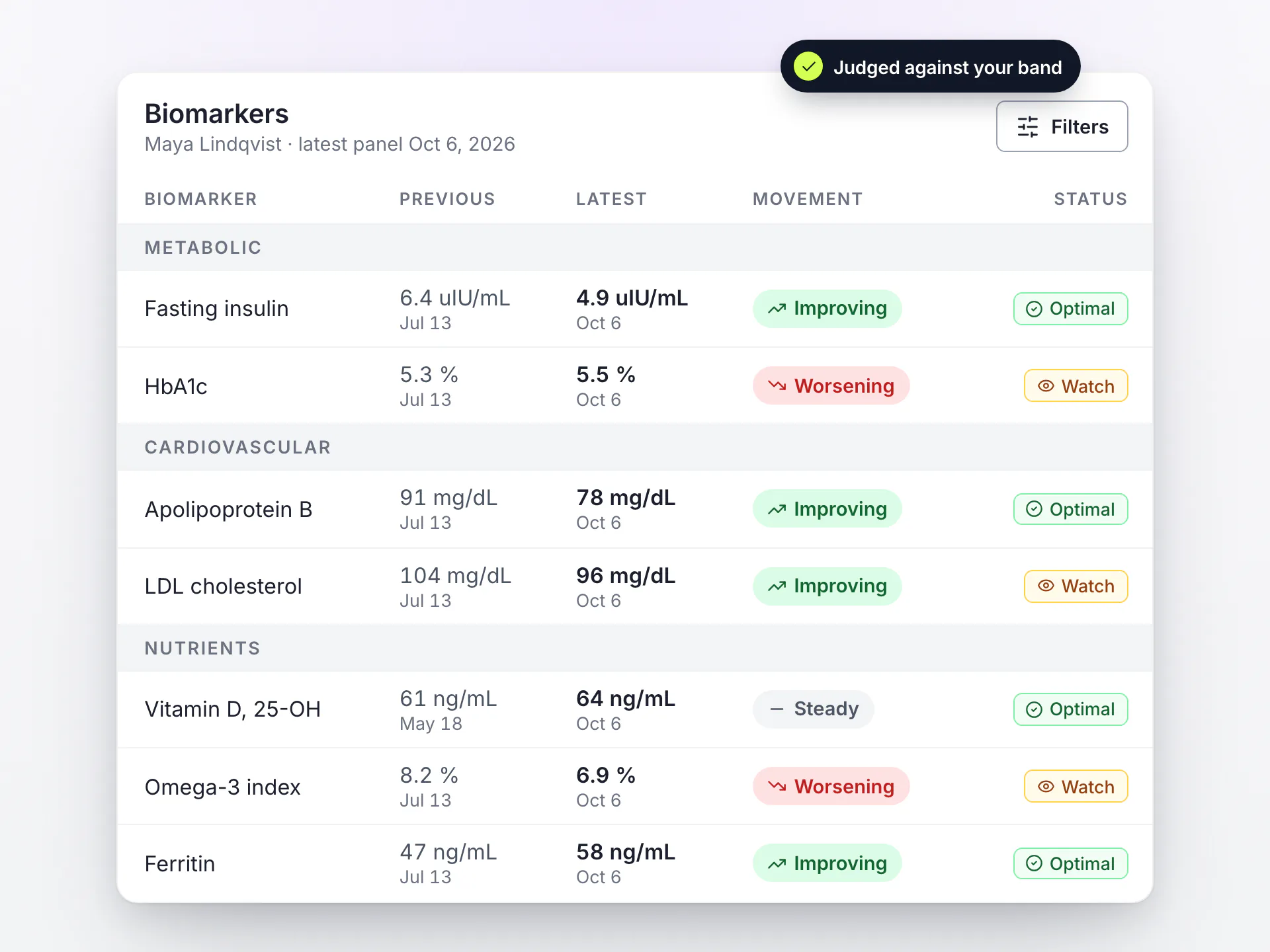
Each biomarker shows its latest value beside the previous one. Movement is judged by distance from your optimal band, not by the raw number, so a value that falls further below optimal reads as worsening, not as an improvement.
Put that next to the patient's care plan and you can see whether a change in protocol showed up in the next panel.
- Improving, worsening or steady, against your own band.
- Two results on the same date are both shown. They are never averaged and never dropped.
- The same reading for the provider in the chart and, once released, for the patient in the portal.
The grade is a comparison. The interpretation is yours.
A value is graded optimal, borderline or critical by comparing it with your band, and nothing more. No AI interprets results or makes a diagnosis. Your providers write every word of interpretation, and clinical decisions stay with them.
What is biomarker tracking software?
Software that stores a patient's lab values as structured biomarkers, grades them against ranges and shows how each one changes across repeated draws. LongevityEHR does this inside a full EHR, next to care plans, notes and the patient portal.
Can each clinic set its own biomarker ranges?
Yes. The clinic owner sets optimal, borderline and critical bands per biomarker, starting from the defaults, and can split any biomarker into separate ranges for female, male and unknown sex. Your clinicians decide which numbers the clinic uses.
What happens to past results when we change a range?
Nothing. Each released value keeps a snapshot of the range that applied when it was recorded, so older results keep their original grade. The editor asks for confirmation before you change a range that already has released results.
Does LongevityEHR use AI to interpret lab results?
No. AI reads the values off the lab report during extraction, and your team reviews them. Grading is a plain comparison with your ranges, and interpretation is written by your providers.
Is LongevityEHR outcomes reporting software for longevity clinics?
It follows outcomes per patient: every biomarker has a trend, the latest value sits next to the previous one, and movement is judged against your optimal band. Reports that aggregate outcomes across your whole patient panel are not a feature today.
Can wearable data show up next to biomarker trends?
Not yet. Wearable data is on the roadmap. Today biomarker trends are built from the lab results your team uploads and releases.
Keep exploring
Your ranges, every draw, the whole history
Start a free trial and set up your clinic's ranges before the next panel comes in.