
LongevityEHR
Pricing

Labs and biomarkers

AI lab extractionLab PDFs into structured valuesBiomarker trackingYour ranges, every result as a trendLab orderingOrder panels from the chartWearablesSleep and activity next to labs

Care delivery

Care plansPlans from your own templatesClinical notesSOAP notes you signAI scribeVisit notes drafted for reviewE-prescribingPrescribe from the chart

Patient and practice

Patient portalYour brand on every screenIntake formsYour forms, assigned in the portalScheduling and videoBooking, calendars and visitsMembershipsSell plans through your Stripe

Built for

Longevity clinicsThe EHR built around the care loopFunctional medicineDeep panels, ranges and protocolsConcierge and DPCMemberships and a member portalHormone optimizationHormone panels tracked over time

More

Platform overviewPricingSecurity and HIPAA

Guides

Start a longevity clinicMembership pricingWhat is longevity medicineEHR vs EMRLongevity certificationFunctional medicine certification

Compare

Best longevity clinic softwareLongevityEHR vs Healthievs Heads Up Healthvs Decoda HealthOptiMantra alternativesCerbo alternatives

Biomarker library

All biomarkersOptimal rangesApoBLp(a)HOMA-IRAll resources
LoginGet Started
  1. Home
  2. Platform
  3. Intake forms

Patient intake forms software that asks your questions

Write the intake and follow-up forms your clinic actually uses, start from a ready-made new patient intake, and assign them to patients in your branded portal. Every answer lands in the chart.

Start free trialBook a demo

15-day free trial · Unlimited patients · BAA on request

LongevityEHR patient chart forms tab with a longevity intake form just assigned to the patient, above earlier reviewed forms

Write it, assign it, read the answers

When intake lives in a PDF or a separate form tool, someone copies the answers into the chart by hand. Here the form, the patient's answers and the chart are one system.

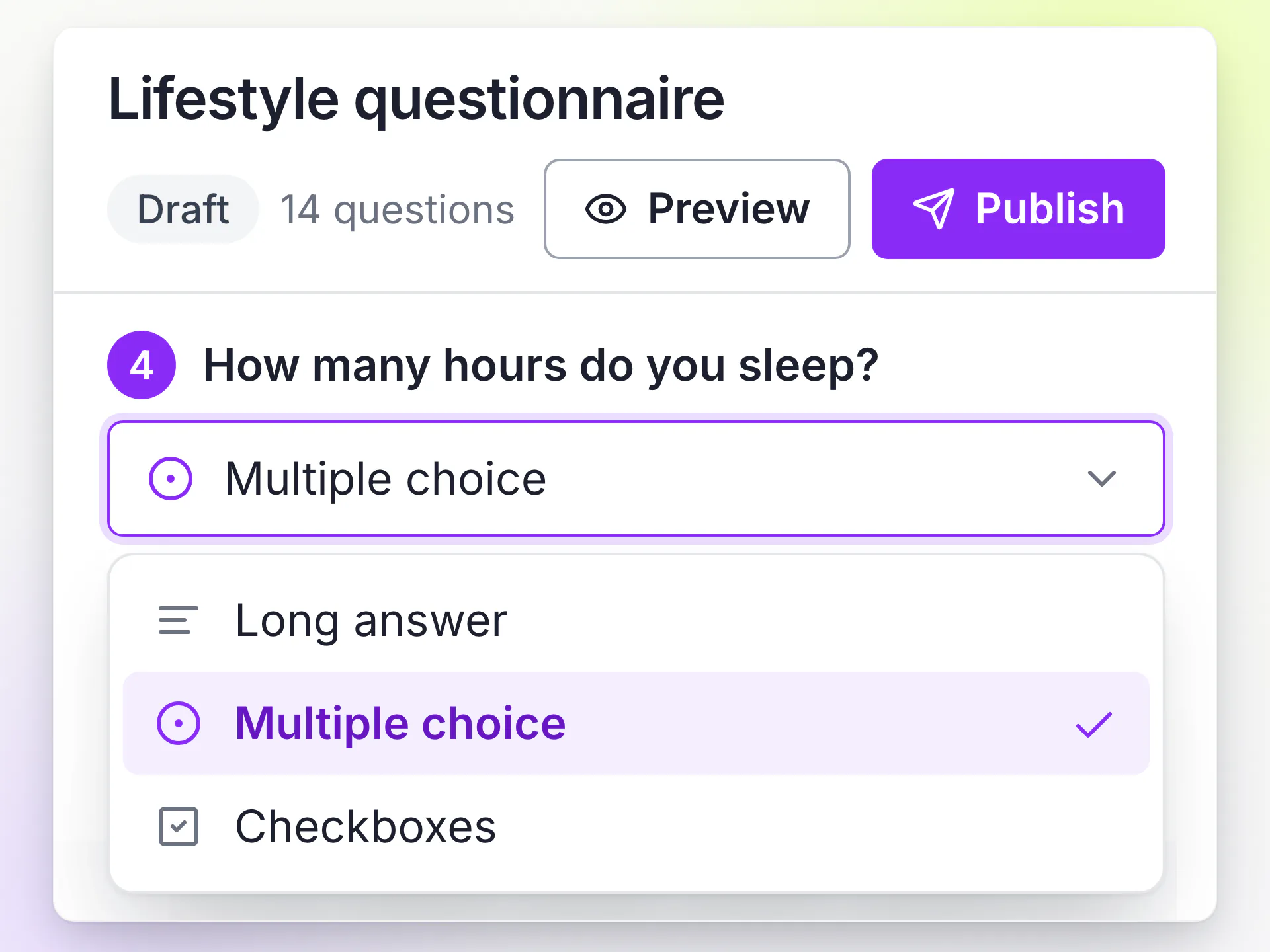
LongevityEHR form builder with a sleep question selected and the question type menu open on multiple choice, with Preview and Publish buttons

Write the form

Build it with short and long text, yes or no, dates, numbers, single and multiple choice, and scales. Preview it, then publish.
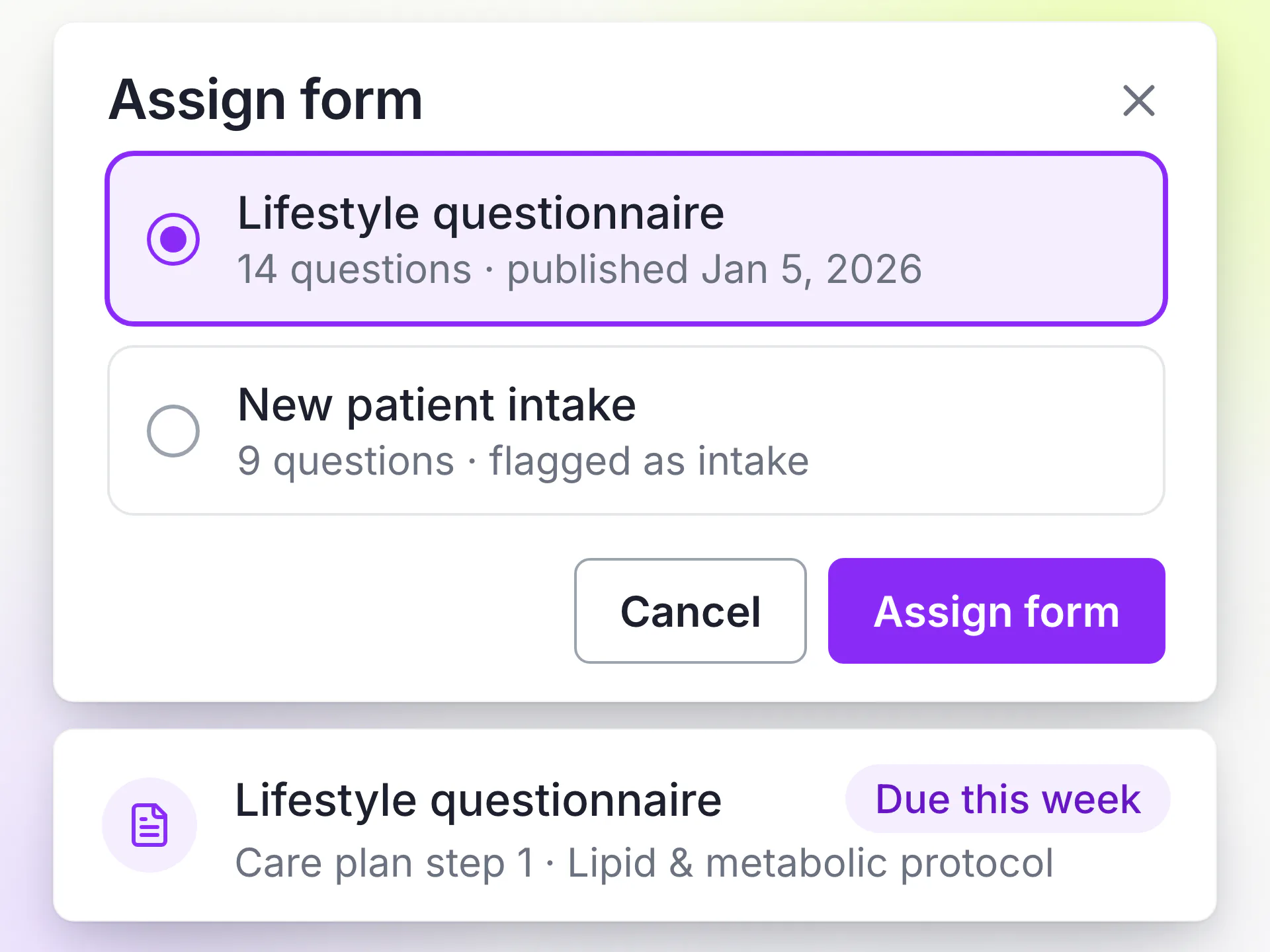
LongevityEHR assign form dialog with a published lifestyle questionnaire selected, above a care plan step naming the same form

Assign it to the patient

Assign a form by hand, flag it as intake so it goes out when the patient activates their portal, or add it as a step in a care plan.
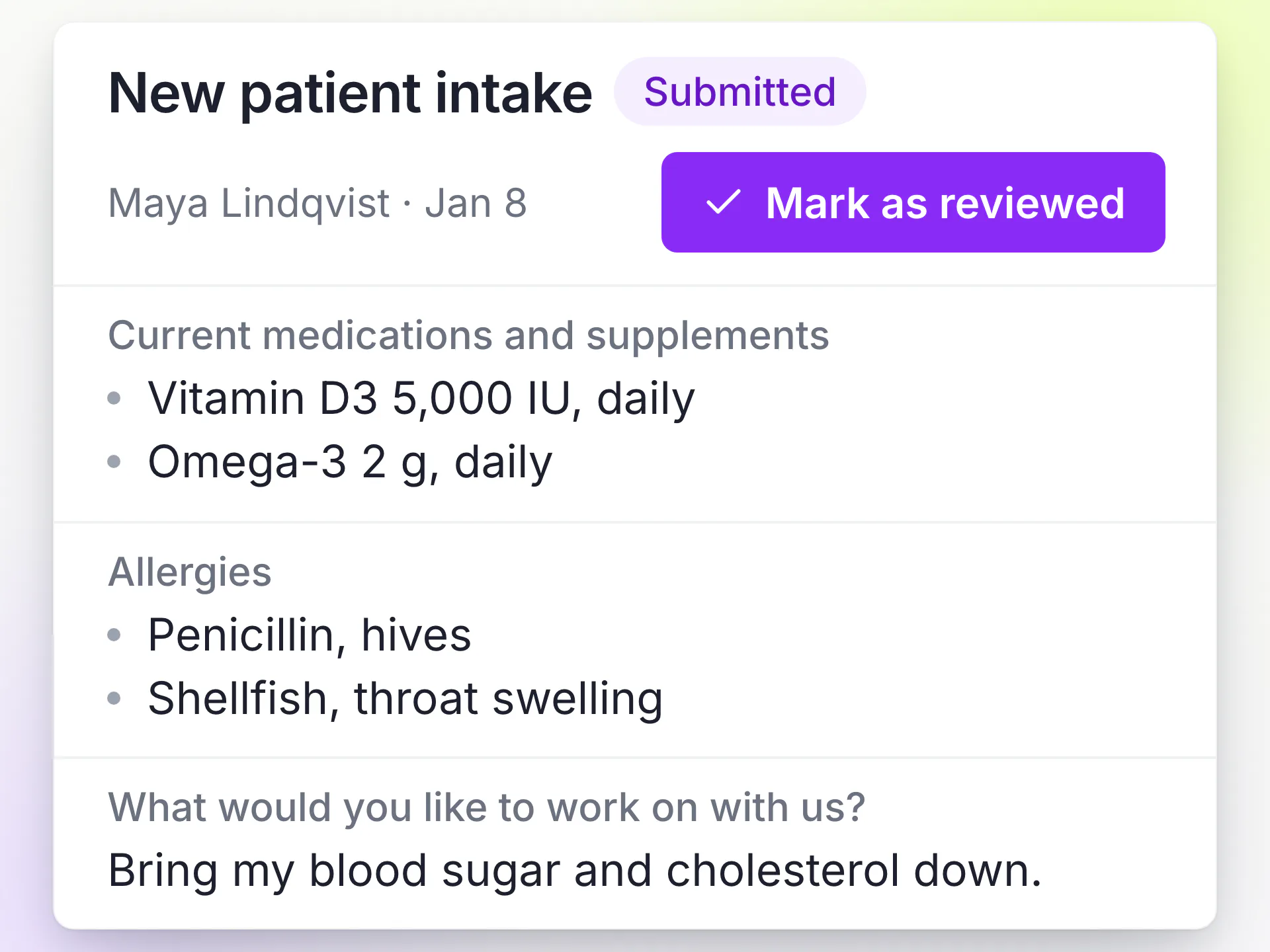
LongevityEHR submitted new patient intake showing medications, allergies and goals with a Mark as reviewed button

Read the answers

Patients answer in your white-label patient portal. The provider reads the submission exactly as the patient saw it and marks it reviewed.

Clinic-authored

The forms your clinic writes

Every clinic authors its own forms with the same builder. There is no fixed questionnaire you have to work around, and no form is shared across clinics.

Published in every new clinic, ready to edit

Starts with
Preferred name, pronouns, phone, medications, allergies, conditions, weight, height and a goals question.
Reaches patients
Flag it as intake and it is assigned when the patient activates portal access.
Yours to change
It belongs to your clinic from the start. Edit it, extend it, replace it or archive it.

Short questions between visits

What it asks
The questions your providers want answered between visits, using scales, yes or no and short text.
Reaches patients
Add it as a step in a care plan, and it is sent when that step comes due.
Where answers go
The submission sits in the chart next to labs, notes and the plan the patient is working through.

The longevity questions a diagnosis list misses

What it asks
Sleep, stress, training, supplements, family history and goals, worded the way your clinic practices.
Fewer questions
Show a question only when an earlier answer calls for it, so patients skip what doesn't apply to them.
Patient experience
Progress is saved as they go, so they can stop and come back to a long form.

What changed since the last visit

Reaches patients
Assign it by hand before a visit, from the patient's chart.
Record fields
Tie questions to the record, so new medications land in the history and weight or blood pressure become new dated readings.
Old answers
Earlier readings are never written over, and every past submission stays readable.

No retyping

Answers that update the patient's record

A question can be tied to a field on the patient's record. When the patient submits, the answer is written there for you, and the submission keeps the original answer as well.
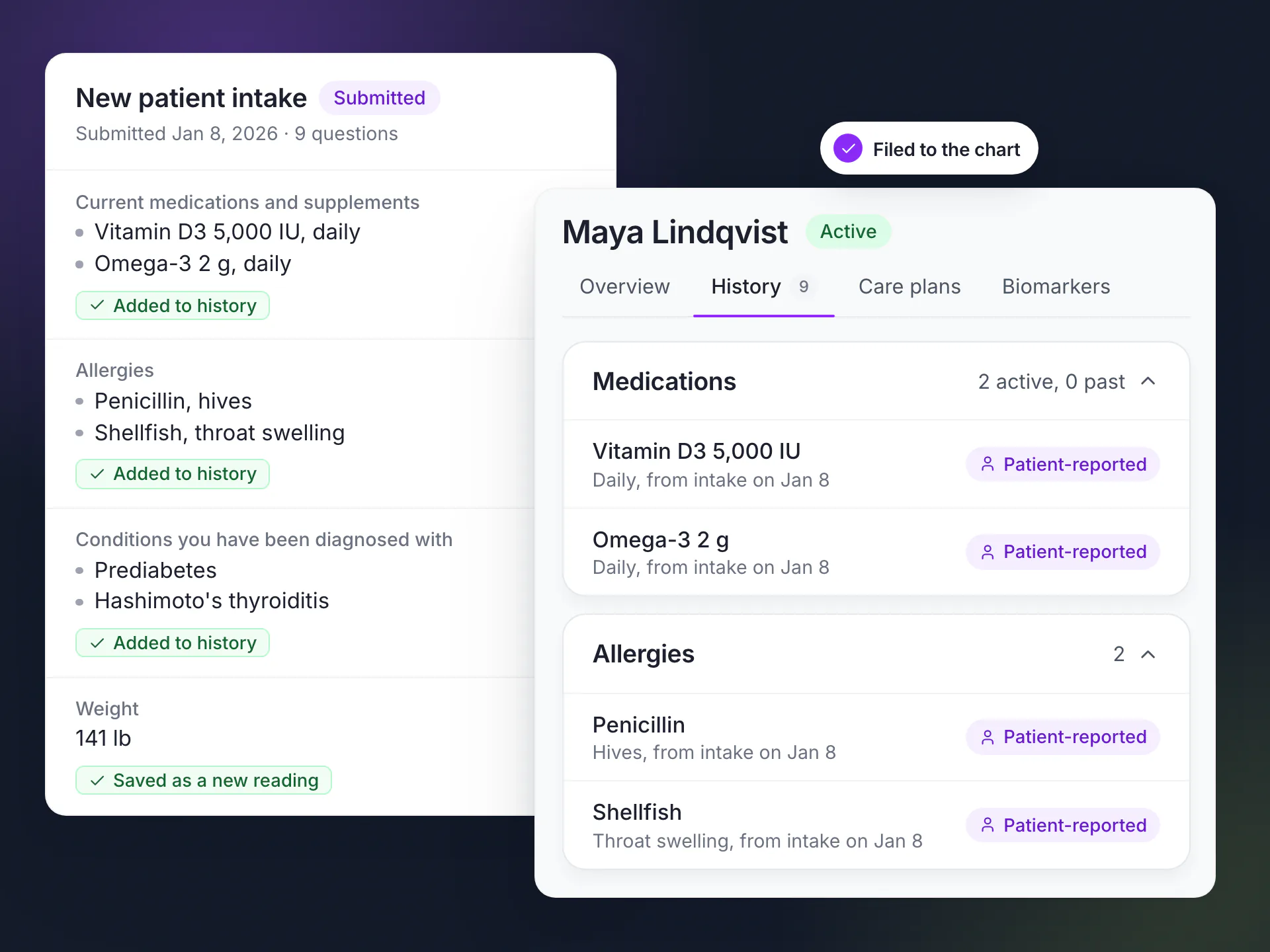
  • Preferred name, pronouns and phone update the patient's profile.
  • Medications, allergies and conditions are added to the patient's history, marked as reported by the patient.
  • Weight, height, waist and blood pressure are saved as new dated readings, never written over earlier ones.
LongevityEHR submitted intake form next to the patient history, with medications and allergies filed to the chart as patient-reported

Show-if rules

Patients only see the questions that apply

Set a rule on any question so it appears only when an earlier answer calls for it. A longevity intake can cover a lot of ground without feeling long.
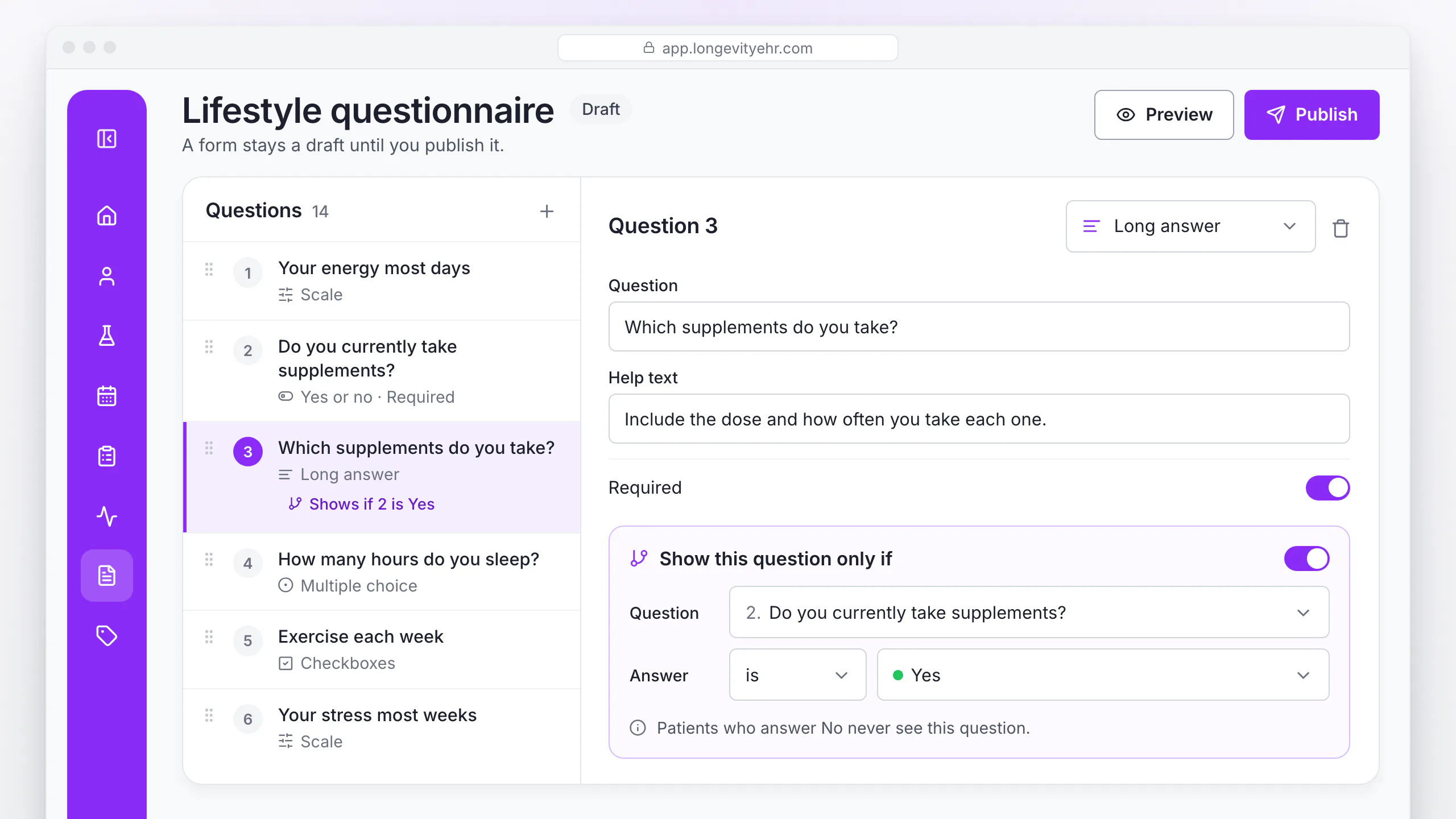
LongevityEHR form builder with a supplements question set to show only when the earlier supplements question is answered yes
Question types: short and long text, yes or no, dates, numbers, single and multiple choice, and scales.

Built to last

Forms you can change without losing old answers

Edit a form a year from now and every earlier submission still reads exactly as the patient answered it.

  • Publishing freezes the version, so what you reviewed is exactly what patients see.
  • Editing a published form opens a new draft. Every answer stays tied to the version the patient actually answered.
  • Retiring a form archives it instead of deleting it. Forms already sent can still be finished, and you can restore it later.
  • Every submission stays readable, including answers to forms you have since archived.
  • Form answers are patient data. Each time staff open a submission, the read is recorded in the audit trail.

Digital consent forms are on the roadmap

Consent forms tied to each service package, signed in the patient portal, are on the roadmap. Today forms collect answers, not e-signatures. See the rest of the platform.

Patient data, handled like it matters

Your patients’ data is never used to train AI models, and every extracted value is checked by your team before it reaches the chart.

How we protect patient data
  • HIPAA compliantRole-based access and an audit trail on clinical data
  • BAA on requestWe sign a Business Associate Agreement
  • Tenant-isolated dataEach clinic's records are walled off from every other clinic's
FAQs

Frequently asked questions

Still unsure? Book a demo and ask us directly.

Can I build my own patient intake form in LongevityEHR?

Yes. Each clinic writes its own forms with a builder that supports text, yes or no, dates, numbers, choice and scale questions, plus rules that show a question based on an earlier answer.

What does the default new patient intake ask?

Every new clinic starts with a published New patient intake covering preferred name, pronouns, phone, medications, allergies, conditions, weight, height and a goals question. It belongs to your clinic, so you can edit, extend or archive it.

How do patients complete online patient intake?

In your branded patient portal. A form flagged as intake is assigned when the patient activates portal access, and their progress is saved so they can finish later.

What happens to old answers when I edit a form?

Nothing changes for them. Publishing freezes a version, and every submission stays tied to the exact version the patient answered.

Does LongevityEHR support digital consent forms?

Not yet. Digital consents signed in the portal are on the roadmap. See what else is coming on the platform page.

Keep exploring

[01]Intake formsYou are here
[02]White-label patient portal[03]Care plans[04]Clinical notes

Intake that reads like your clinic wrote it

Start a free trial and send your own new patient intake from your branded portal.

Book a demoSee pricing
LongevityEHR

The EHR and white-label patient portal for longevity, functional medicine and concierge clinics.

Platform

  • Overview
  • AI lab extraction
  • Biomarker tracking
  • Lab ordering
  • Wearables
  • Care plans
  • Clinical notes
  • AI scribe
  • E-prescribing

Practice

  • White-label patient portal
  • Intake forms
  • Scheduling and video visits
  • Memberships and payments

Solutions

  • Longevity clinics
  • Functional medicine
  • Concierge and DPC
  • Hormone optimization

Compare

  • Best longevity clinic software
  • LongevityEHR vs Healthie
  • LongevityEHR vs Heads Up Health
  • LongevityEHR vs Decoda Health
  • OptiMantra alternatives
  • Cerbo alternatives

Resources

  • All resources
  • Biomarker library
  • How to start a longevity clinic
  • Longevity membership pricing
  • What is longevity medicine?
  • Longevity medicine certification
  • Functional medicine certification
  • EHR vs EMR

Company

  • Pricing
  • Security and HIPAA
  • Contact

© 2026 LongevityEHR. All rights reserved.

  • Terms & Conditions
  • Privacy Policy
  • Business Associate Agreement