

SOAP notes software for longevity clinics
Write Subjective, Objective, Assessment and Plan in the same chart as labs, biomarkers and care plans. Sign when it's final, correct it with a linked amendment and decide, note by note, what the patient can read.
15-day free trial · Unlimited patients · BAA on request
Four sections, in the order clinicians write. The note explains why the numbers changed.
In longevity care, a note is where a provider records why a plan changed: what the last panel showed, what the patient reported and what happens next. In LongevityEHR the body of every note is four structured fields, not one free-text box, and it lives in the chart a click away from the patient's biomarker trends and care plan.
Subjective
What the patient tells you: how they feel, what changed since the last visit and what they want to work on.
ExampleSleeping about six hours a night since starting the new training block. Asks about afternoon fatigue.
Objective
What you measured. The latest released labs and the trends since the last panel sit in the same chart, so there is no second system to check.
ExampleVitals taken today. Latest released panel reviewed in the chart.
Assessment
Your clinical reading of what the patient reported and what you measured. Today your providers write every section of every note themselves.
Plan
What happens next, written next to the care plan the patient is already working through, so the note and the plan tell the same story.
ExampleRetest the same panel before the next follow-up and review the plan then.
The note lifecycle
Draft, sign, amend
Three stages, each with its own rules, so everyone in the clinic knows what a note means and a draft never passes for a final record.
Draft
A draft is visible only to its author, who can edit it or discard it. An unfinished thought never reads as clinical fact to the rest of the team.
Sign
Signing makes the note final. The note records its author and when it was signed, and from that moment it is never edited or deleted.
Amend
A correction is a new note linked to the one it corrects, and the original shows that it was amended. The history stays readable instead of piling up as unconnected notes.
Patient visibility
You choose which notes the patient reads
Sharing a note is a deliberate choice. The clinic owner sets a default for newly signed notes, and until the clinic sets one, notes stay private. The provider can override that default for a single note when signing it.
Visible notes appear in the patient's My Notes section of your white-label patient portal. Drafts never reach the patient.
- A note signed as private can be made visible later from the notes list.
- Once a note is visible it stays visible, so patients never see a note disappear.
- An amendment always follows its original: a correction to a shared note is shared, and a correction to a private note stays private.
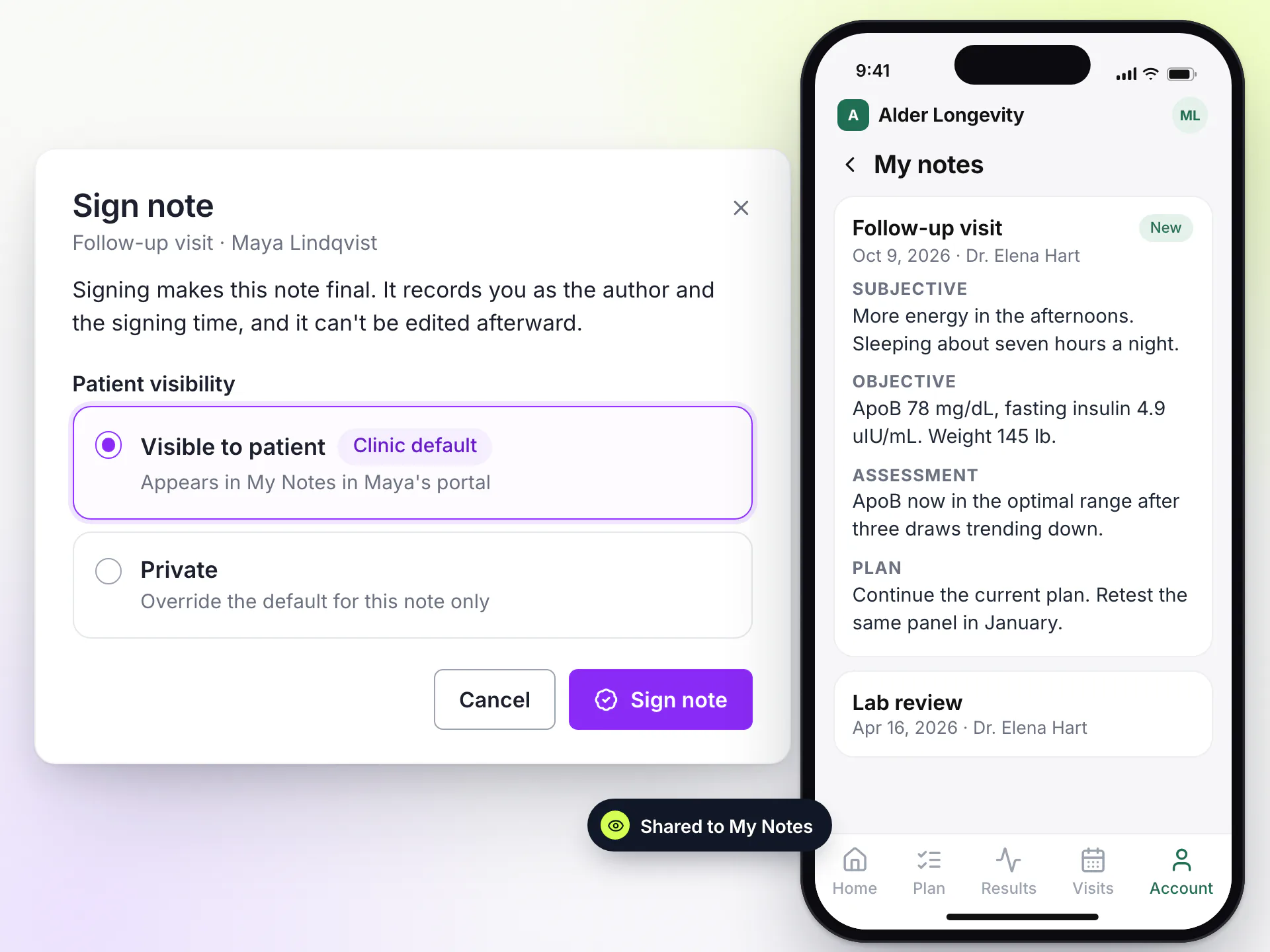
A draft stays with its author, and a signed note is never edited or deleted.
Clinical documentation you can stand behind
Notes are part of the patient's clinical record, so the record keeps every version of the story.
Signed means final
Each signed note carries its author and signing time, and no one can edit it afterward.
Nothing destroyed
Signed notes are never deleted. Corrections add to the record instead of overwriting it.
Amendments stay linked
Every correction points back to the note it corrects, and the original shows that it was amended.
Audit trail
Every read of and change to patient data is recorded: who, which patient and when. More on our security page.
An AI scribe is on the roadmap
Visit notes and a chart recap drafted for the provider to review, edit and sign. It is not available today. Today your providers write every note, and they will still sign every note when the AI scribe ships.
Patient data, handled like it matters
Your patients’ data is never used to train AI models, and every extracted value is checked by your team before it reaches the chart.
How we protect patient data- HIPAA compliantRole-based access and an audit trail on clinical data
- BAA on requestWe sign a Business Associate Agreement
- Tenant-isolated dataEach clinic's records are walled off from every other clinic's
What is SOAP notes software?
Software for clinical documentation in the SOAP format: Subjective, Objective, Assessment and Plan. In LongevityEHR those notes live in the patient's chart next to labs, biomarkers and care plans.
Can a signed clinical note be edited?
No. A signed note is final. To correct it, a provider writes an amendment that links back to the original, and the original shows that it was amended.
Can patients see their clinical notes?
Only the notes your clinic chooses to share. The clinic sets a default, the provider can override it when signing, and visible notes appear in the patient's portal.
Can a clinical note be deleted?
The author can discard a draft. A signed note is never deleted, because it is part of the patient's clinical record.
Is LongevityEHR just clinical notes software?
No. Clinical notes are one part of a standalone EHR that also holds lab results, biomarker trends, care plans, forms, scheduling, payments and the patient portal.
Does LongevityEHR have an AI scribe?
Not yet. An AI scribe that drafts visit notes for provider review is on the roadmap. Today notes are written by your providers.
Keep exploring
Every note signed, linked and in its place
Start a free trial and write your first SOAP note in the same chart as your labs and care plans.