
On this page
- What lab data can be captured from documents
- How the capture workflow works
- Where extraction goes wrong
- How to verify extracted data before it is used in care
- Getting captured data into longitudinal tracking
- Privacy and security when processing lab documents
- How to pilot a capture workflow
- Why a purpose-built tool beats a generic one
- Try it on your own reports
Key takeaways
- Lab reports arrive in many layouts, so reliable capture needs more than OCR (optical character recognition, software that reads text from images): it needs structure-aware extraction, normalization and validation.
- Published studies report strong but imperfect extraction accuracy, which is why a provider review step belongs in every workflow.
- Verify five things before data enters care: patient identity, dates, test names, values with units, and reference ranges.
- Pilot on a sample of your own reports and track accuracy, correction rate, review time and usability before you roll out.
- LongevityEHR extracts lab values into the clinic's own biomarker ranges, and a provider reviews the result.
Capturing lab data from documents means turning a PDF, a scan or a faxed report into structured fields (test name, value, unit, reference range, date, patient) that sit in the patient record and can be trended. For a cash-pay longevity, functional medicine, concierge or hormone clinic, the workable approach is AI extraction that maps results into the clinic's own biomarker ranges, followed by a provider review before anything is used in care. That is how AI lab extraction in LongevityEHR works, and the rest of this guide explains why each stage matters and how to run it.
What lab data can be captured from documents
A lab report carries more than a list of numbers. The fields a clinic usually needs are the report or collection date, the test item name, the result, the unit and the reference range. Federal rules on test reports show why each field matters: under 42 CFR 493.1291, a test report must identify the patient, the performing laboratory, the report date, the test, the specimen source when appropriate, and the result with units or interpretation when applicable. CLIA, the Clinical Laboratory Improvement Amendments, is the federal framework behind that rule.
A clinic that captures only the value and drops the unit or the date has data it cannot safely trend. A glucose of 92 means one thing in mg/dL and something else in mmol/L. A testosterone drawn in the morning fasted is not the same data point as one from a random afternoon draw, so the collection date and any specimen notes carry clinical weight.
Formats and layouts that cause trouble
In practice a longevity clinic receives reports from national labs, hospital portals, specialty and functional testing labs, and outside physicians. Formats include native PDFs with selectable text, scanned paper, phone photos and faxes. The layouts vary just as much. A 2023 study of scanned paper lab reports from a hospital in Beijing (so not a US lab mix) describes double-column pages, bilingual test names, qualitative results (positive or negative) next to numeric ones, shifting column order, and extra method or notes columns. Any one of these can push a value into the wrong field.
The same study notes that paper reports remain common and mix text, numeric values, reference ranges, dates and units in non-standard layouts. Specialty panels common in longevity practice, such as hormone, advanced lipid or nutrient panels, add their own conventions, including ranges printed as bands, footnotes and flags.
How the capture workflow works
A dependable workflow has stages, and each one can fail on its own.
- Intake and preprocessing. The document is received, cleaned up (noise reduction, straightening, contrast) and split if a single file holds several reports.
- Text recognition. OCR reads the characters on scanned pages. Native PDFs can skip this step.
- Structured extraction. The system identifies which text is a test name, a result, a unit and a range.
- Normalization. Decimal separators, units and range formats are standardized and matched to a biomarker list.
- Validation. Values are checked against expected data types and plausible ranges.
- Human review. A provider or trained staff member confirms the result before it enters the chart.
A 2026 document-analysis study lays out essentially this staged pipeline and stresses that OCR is only an intermediate step: final quality depends more on how well the extraction method handles document structure. For a clinic evaluating tools, that means a demo that reads clean text is not evidence that the tool handles a two-column hormone panel with a footnote.
What published results look like
Extraction research gives a realistic picture of what to expect:
- A pipeline built for scanned paper lab reports reached an average OCR accuracy of 0.93 and an overall F1 of 0.86 across test name, result, unit and reference range on 153 reports. F1 is a score that balances how many extracted items were right against how many were missed.
- A 2026 US study processed 1,303 scanned PDFs from 116 outside institutions, splitting multi-report files into individual documents and classifying them. Outside records are exactly the messy input clinics see when new patients bring prior labs.
- A 2026 paper on a multi-engine OCR system reported 98.3% lab parameter extraction accuracy on 80 lab report images. It appeared in a journal that is not indexed in PubMed, so give it less weight than the peer-reviewed studies above.
The spread between these numbers is the point. Accuracy depends on document quality, layout variety and the method, so your own reports are the only test that counts. It also explains why every credible workflow keeps a human in the loop.
Where extraction goes wrong
A 2026 validation study from the Netherlands compared large language model assisted extraction with manual extraction for 60 patients (1,482 pages). Six experts reviewed 2,555 extracted values and sorted errors into five types: incorrect, incomplete, missing, hallucinated (a value that is not in the source) and overcomplete. Overall F1 was 0.86, and the categories with the most narrative content, pathology and patient history, scored lowest at 0.81 each.
Translated to a lab workflow, the error types look like this:
| Error type | What it looks like in a lab report | Why it matters |
|---|---|---|
| Incorrect | A value read as 5.8 instead of 5.3, or a unit swapped | A wrong trend point or a missed flag |
| Incomplete | Range captured as the upper limit only | Misleading flag status |
| Missing | A row on page two never captured | A marker absent from the trend |
| Hallucinated | A value that is not on the report | Data with no source |
| Overcomplete | Extra fields captured that were not requested | Clutter and mistakes in the chart |
Errors are predictable in kind, and a good review step is built to catch those kinds.
How to verify extracted data before it is used in care
Treat extraction as a draft that a clinician signs off. The review should check five things, in this order.
1. Patient identity
Confirm the name and a second identifier, usually date of birth, match the chart. Patient-safety guidance on verification calls for at least two identifiers before test results are entered in a record. Misfiled results are a serious error, because the wrong patient's data then drives a care plan.
2. Dates
Check the collection date and the report date separately. Longitudinal tracking depends on the collection date, and a trend that uses the report date will drift. For multi-report files, confirm each report carries its own date.
3. Test names
Match each extracted name to the correct biomarker. Labs name the same marker in several ways, and a mismatch can attach a value to the wrong marker in your list. Confirm that similar markers (total versus free testosterone, for example) were not merged.
4. Values and units
Compare each value and unit with the source, and look hardest at anything flagged or far from the patient's previous result. Validation against medically plausible ranges, as described in the staged pipeline above, catches typographical-scale errors but not a plausible wrong number, which is why the source stays one click away during review.
5. Reference ranges
The printed laboratory range and the range your clinic uses to guide care are different things. Lab ranges describe a reference population, while many longevity practices work to narrower, clinic-defined targets. Our page on optimal ranges versus reference ranges covers the difference. The practical point for capture is that the extracted value should be interpreted against the range your clinic has defined, not only the one printed on the PDF.
Two habits make this review fast. Review side by side, with the extracted fields next to the source page. And review by exception where your protocol allows, concentrating attention on flagged results, large changes from the prior draw, and fields the system could not read confidently. Your medical director should decide the review protocol, since what counts as sufficient verification is a clinical governance question for your practice.
Getting captured data into longitudinal tracking
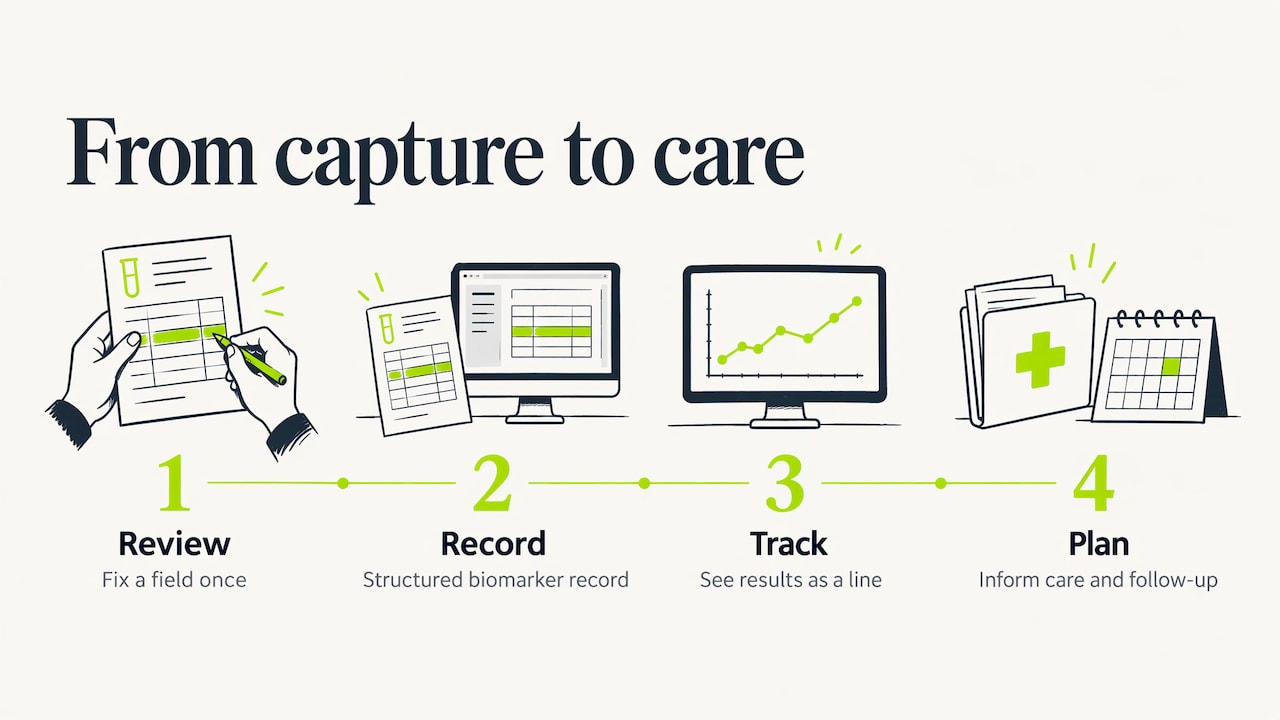
Capture is only useful if the result lands somewhere it can be trended. The Office of the National Coordinator for Health IT (ONC) task force on interoperability standards recommends complete and accurate coding at the data source, with standard metadata maintained as results move between systems, rather than correcting externally sourced data downstream. For a clinic ingesting PDFs, that means making each correction once, at the point of entry, so every later view reads the corrected value.
In practice that means extracted results should flow straight into a structured biomarker record, so that a provider sees the patient's ApoB, HbA1c or free testosterone as a line over time, not as a stack of attachments. This is what biomarker tracking is for: the value of a lab report rises sharply once it becomes a data point next to the last four.
From there, the results can inform care plans and follow-up. If you also order panels through the same system, our overview of lab ordering software shows how ordering and results connect, and the blog post on how AI reads lab reports goes deeper on extraction, accuracy and review.
Privacy and security when processing lab documents
A lab report with a patient's name on it is protected health information under HIPAA. Two points matter for any capture workflow.
First, the vendor handling the documents is typically a business associate. HHS guidance on cloud services states that when a covered entity uses a provider to create, receive, maintain or transmit ePHI on its behalf, that provider is a business associate, and the covered entity needs a business associate agreement (BAA) in place. A BAA is a written contract setting out how the vendor may use and safeguard the data. LongevityEHR is HIPAA, with a BAA on request, and uses role-based access and tenant-isolated data. More detail sits on our HIPAA security page.
Second, keep documents out of unmanaged channels: personal email, consumer chat tools and shared drives. A capture workflow is also a way to reduce those habits, because staff have one governed place to upload reports.
This is general information, not legal advice. Have your compliance counsel or a qualified healthcare attorney review your specific arrangements.
How to pilot a capture workflow
Before you move every patient onto a new workflow, test it on a bounded sample of your own documents.
- Build a test set. Collect 30 to 50 de-identified or consented reports that reflect your real mix: national lab PDFs, specialty panels, outside scans and at least a few poor-quality images.
- Create ground truth. Have a trained staff member transcribe the key fields by hand. Studies use this method: the OCR paper above compared against manual transcription by a trained professional.
- Run the extraction and score it. Count fields that were correct, corrected, missing or invented.
- Time the review. One study of paper assessment forms found automated tools extracted fields at an average of 70% accuracy, with crowd validation taking a mean of 157 seconds per document. Your own numbers will differ, but review time per report is the figure that tells you whether the workflow saves labor.
- Check usability. Ask the providers who will review whether the side-by-side view is clear, and whether flagged items are easy to find.
- Set a go or no-go threshold. Agree in advance what correction rate and review time you will accept.
Track four measures throughout: field accuracy, correction rate, processing and review time, and clinician usability. Run the pilot again when you add a new lab source, because layouts are what break extraction.
Why a purpose-built tool beats a generic one
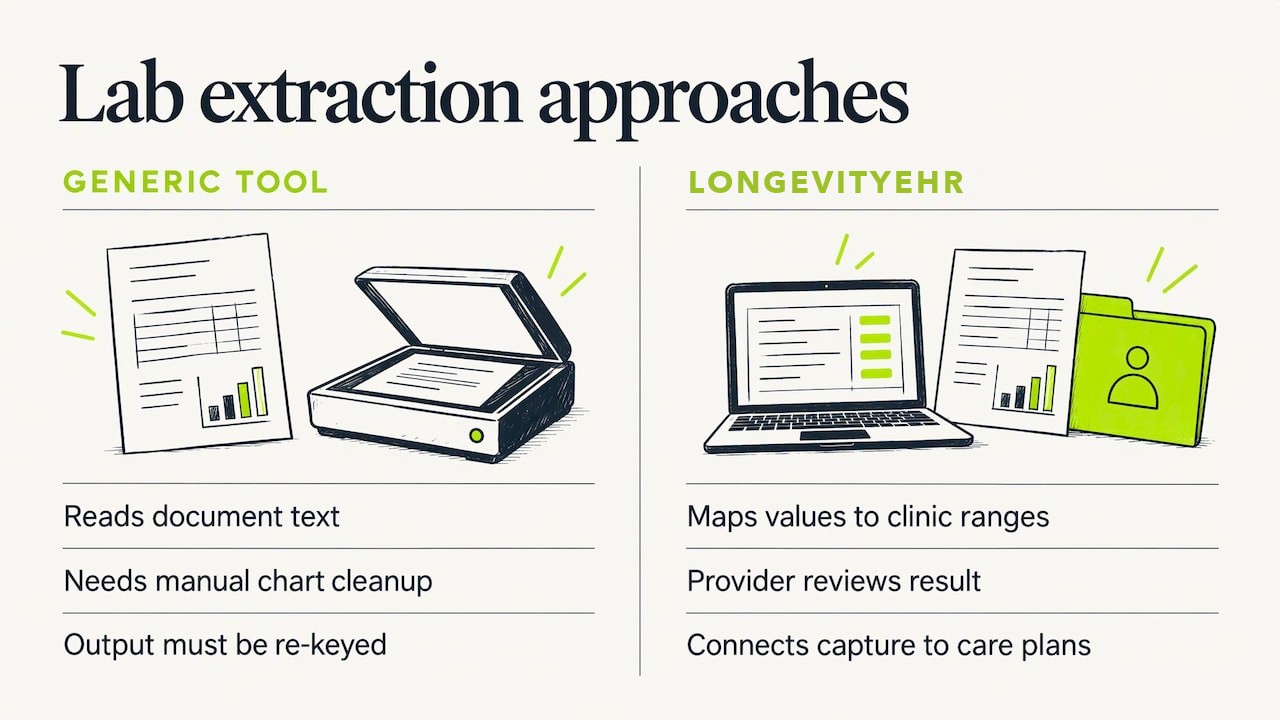
A general document extraction tool can read text. What it does not know is your clinic's biomarker list, your target ranges, or where the result goes next. Cleaning its output into a chart is the manual step that erases the time saved.
LongevityEHR's AI lab extraction places values directly into the clinic's own biomarker ranges, and the provider reviews the result. The same platform holds clinical notes, intake forms, care plans built from clinic templates, scheduling with video visits, memberships and payments through the clinic's own Stripe account, and a white-label patient portal. Capture is therefore one step in a loop that continues into the plan and the follow-up, not a separate tool whose output must be re-keyed. Our functional medicine EHR page shows how custom ranges work in that setting.
Our view on lab capture
We built LongevityEHR for clinics that practice on a cash-pay model, where the lab review is the center of the visit and the patient is paying for judgment, not paperwork. In that model, retyping values from a PDF is the least valuable thing a physician or staff member can do.
Our position is simple: extraction should save time, and the provider should still make the call. That is why our AI reads the report into the clinic's own biomarker ranges and a provider reviews it before it becomes part of the record.
We also think a clinic's ranges are part of its clinical identity. When a practice defines what optimal looks like for ferritin or fasting insulin, the software should speak that language from the first import, not after a manual remap.
Try it on your own reports
The fastest way to judge a capture workflow is to run your own documents through it. LongevityEHR offers a 15-day Trial at $0 that covers AI extraction on up to 10 lab PDFs, so a full 30 to 50 report pilot runs on a paid plan such as Core. Every plan includes unlimited patients. Paid plans are priced per seat:
| Plan | Monthly | Billed annually |
|---|---|---|
| Trial | $0 for 15 days | Not applicable |
| Core | $99 per seat a month | $69.30 per seat a month ($831.60 a year) |
| Scale | $199 per seat a month | $139.30 per seat a month ($1,671.60 a year) |
| Enterprise | Custom pricing | Custom pricing |
Annual billing is 30% off. See the full details on the pricing page.

Run your longevity clinic on one system
- AI lab extraction with provider review
- Your ranges, every result as a trend
- Memberships through your own Stripe
15-day free trial. BAA on request.
Sources
- Extracting laboratory test information from paper-based reports
- Automating the segmentation, date extraction and classification of outside medical records
- Document analysis methods for automated extraction of medical data
- Validating large language model assisted data extraction
- Extracting medical information from paper COVID-19 assessment forms
- MEDEXA, AI-powered virtual healthcare assistant
- 42 CFR 493.1291, Standard: Test report
- ONC Interoperability Standards Priorities Task Force update, March 2019
- HHS Guidance on HIPAA and Cloud Computing
- Oops, Sorry, Wrong Patient! A Patient Verification Process Is Needed Everywhere (PubMed)