
On this page
- What a task is in an EHR
- Which tasks an EHR should manage
- How assignment, priority and escalation work
- Connecting tasks to records, labs, plans and scheduling
- What the research says about results
- Building a repeatable follow-up loop
- What to assess when choosing software
- Where the platform fits
- Pricing and getting started

Key takeaways
- A task is an accountable action tied to a patient workflow that needs a final disposition. A message or a stored note is not a task.
- Strong task systems assign work to a person or a role, set a priority, show status, and report on items that are late or incomplete.
- The highest-volume tasks in most clinics are lab review, patient call-backs, follow-up visits and care plan updates.
- Research on task tools is encouraging but modest: visibility and accountability improve more reliably than on-time completion.
- Our platform covers the workflow pieces that generate follow-up work: AI lab extraction, care plans from clinic templates, clinical notes, intake forms, scheduling with video visits, memberships and a white-label portal.
EHR task management is the part of a record system that turns clinical and administrative follow-up into assigned, tracked work items. Each item has an owner, a priority and a status, and each one must be closed with a recorded outcome. For a cash-pay clinic, it is the difference between a lab result that sits unread and a result that triggers a review, a plan update and a patient message within a defined window.
This guide explains what a task is in standards terms, which tasks a clinic should manage, how assignment and escalation work, what the published research shows, and how to build a repeatable follow-up loop in a longevity, functional medicine, concierge or hormone practice. It is general information for clinic owners and operators, not legal, clinical or financial advice.
What a task is in an EHR
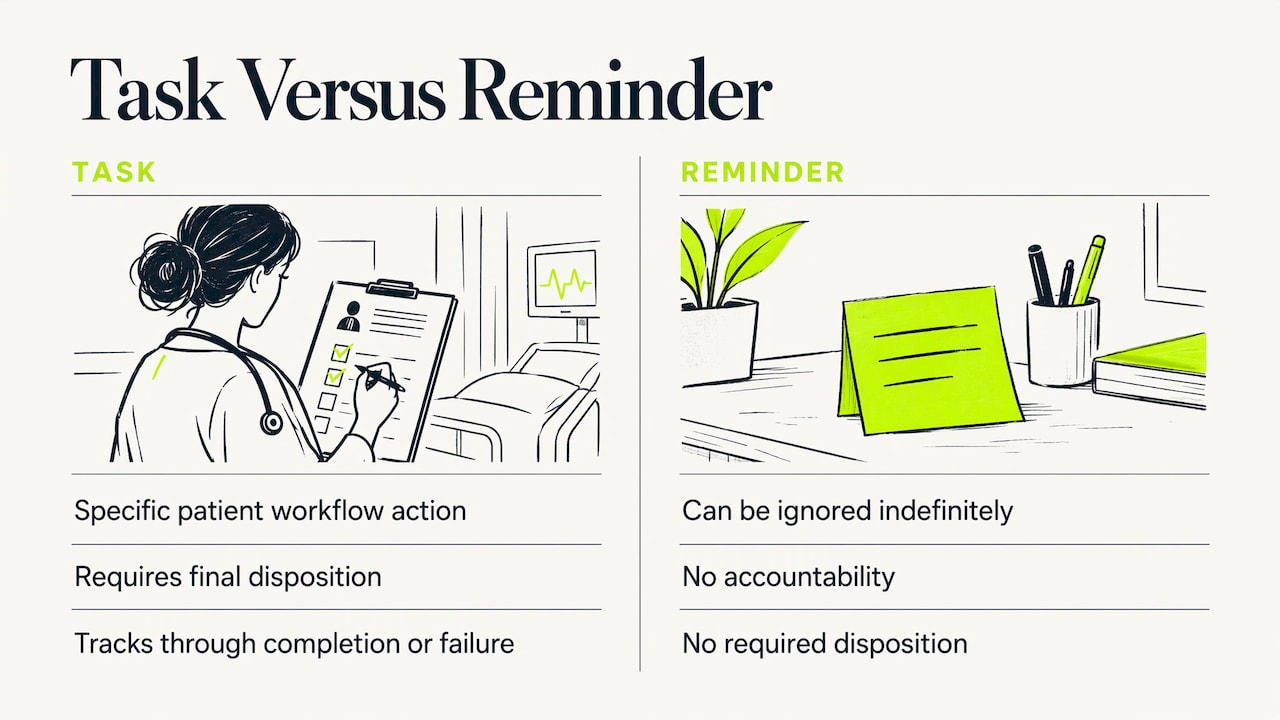
A task is not a chat message and not a stored fact. HL7's functional model for EHR systems describes task management as the ability to create, schedule, update and manage tasks with appropriate timeliness. Unlike general care-process communication, tasks call for action on a specific workflow in the patient record and require a final disposition. That final disposition is the defining feature. A task that can be ignored indefinitely is a reminder, and a reminder does not carry accountability.
The FHIR standard models the same idea in data terms. The Task resource tracks an activity from creation through completion or failure, and it is kept separate from the operational details held in the clinical resource it points to. FHIR describes it as suited to workflow steps such as signing orders, fulfilling orders, admitting patients and processing communications. The states it supports include Created, Ready, In Progress, Completed, Failed and Cancelled, so a system can tell queued work from active work, and finished work from work that was stopped or failed.
The openEHR Task Planning specification adds a practical observation. With ordinary EHR instructions, workers often have to convert orders into individual tasks in their heads. Task planning instead represents planned actions and observations that can be displayed, verified, performed or declined, and signed off. For a clinic, the lesson is that an order or a plan line is not yet work. It becomes work when someone is named as responsible and a due point exists.
Which tasks an EHR should manage
Task management covers clinical and administrative work. HL7 gives examples of clinical tasks that can be routed to the right staff member or role: reviewing received laboratory results, returning patient calls, collecting urine specimens and routing INR results. A Maryland health department list of EHR functions goes further and includes scheduling-related workflows, preventive-service reminders, follow-up notifications, referral communication, task assignment, task tracking and timeliness reporting.
A study of physician task lists classified clinical tasks into four action types: Assess, Order, Communicate and Perform. Among 500 sign-out tasks, Assess and Order were the most common actions, and tests, especially laboratory and imaging tests, were the most common components. That study was done in hospital sign-out, not in cash-pay outpatient practice, but the pattern is familiar to any longevity clinic: much of the work is waiting on labs and deciding what to do about them.
A task inventory for a cash-pay clinic
Before choosing tools, list the recurring work. A typical inventory for a longevity or functional medicine practice looks like this:
| Task category | Example | Usual owner | Typical trigger |
|---|---|---|---|
| Lab review | Review a new panel against the clinic's target ranges | Provider | Results received |
| Data entry check | Confirm extracted values match the source report | Clinical assistant or provider | Report uploaded |
| Care plan update | Revise supplements, protocol or targets after review | Provider | Lab review completed |
| Patient communication | Send results summary, return a call | Nurse or care coordinator | Review completed, patient message |
| Scheduling | Book a follow-up or retest visit | Front desk | Plan change, retest interval |
| Intake | Confirm intake and consent forms are complete | Front desk | New patient booked |
| Membership and billing | Resolve a failed card payment | Practice manager | Payment failure |
| Documentation | Finish and sign visit notes | Provider | Visit ended |
The owner column matters as much as the task name. A task assigned to "the team" tends to belong to nobody.
How assignment, priority and escalation work
The HL7 requirements for task creation, assignment and routing describe what a capable system does. Tasks can be assigned to users or roles, routed in sequence or in parallel, prioritized by urgency or by clinical and business rules, shown in user-specific or role-specific lists, and reassigned to an available role when the selected role is unavailable. The same page notes that tasks may be created automatically from events, such as receipt of laboratory results, and assigned to a responsible user or role for review.
Three design choices follow from that.
- Assign to roles first, then people. A role such as "lab reviewer" survives vacations and staff changes. A named person does not.
- Tie priority to rules, not to mood. Define in advance which results or messages need same-day handling and which can wait for a weekly review.
- Define what happens when a task ages. Escalation can be as simple as a daily list of open items older than a set number of days, reviewed by the practice manager.
Setting completion windows
A pediatric hospital in Melbourne embedded an electronic task-management system in its EHR for nonurgent inpatient tasks across medical, nursing and allied-health staff. It used mandatory completion windows of 2, 4 or 8 hours. Outpatient clinics work on a different clock, but the principle transfers: pick a small number of fixed windows (for example same day, 48 hours, one week) and assign every task type to one of them. Too many categories makes the list unusable.
Dependencies and sequencing
Some work cannot start until other work is done. The Shared Care Planning implementation guide states that tasks can support dependencies and sequence one task after another. In a clinic, a care plan revision should not be created before the lab review is signed, and the patient message should not go out before the plan is final. Sequencing prevents patients from receiving conflicting instructions.
Connecting tasks to records, labs, plans and scheduling
Task lists are only as useful as their link to the chart. A mobile EHR-connected application called Carelign displayed EHR data and user-generated information together and let users link task items to problem-based care plans and export active items into progress notes. The practical point is that the person closing a task should see the underlying data and be able to document the outcome in one place.
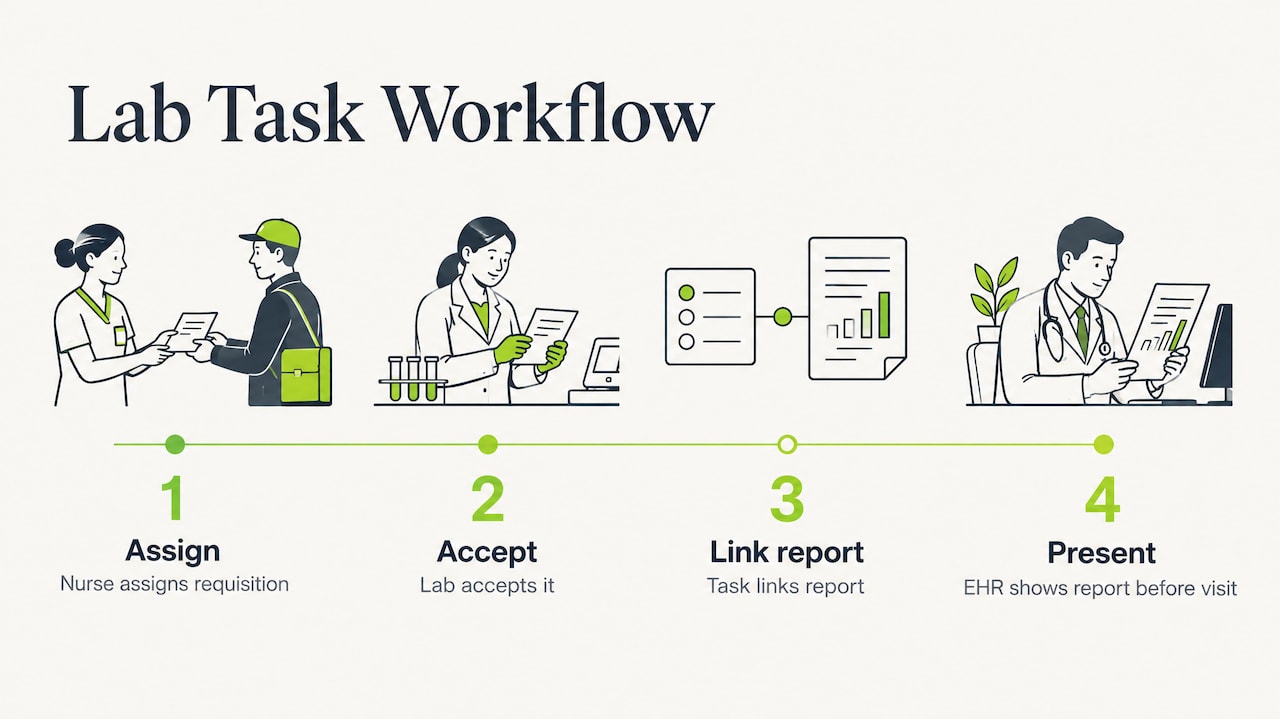
FHIR workflow examples illustrate the same idea across systems. In an end-to-end lab workflow, a nurse assigns a requisition to a lab, the lab accepts it, and the Task is updated with a link to the report, which the EHR then presents to the clinician before the visit. Referral coordination follows a similar chain: a request and task go to a specialty practice, a coordinator accepts it, appointment details update a sub-task, and completion flows back to the referring provider.
The Melbourne system also offered searchable, filterable task reports, visible completion feedback, category-based task creation, comments, and access from the patient chart through an ordering pathway staff already knew. Familiar entry points matter. If staff must leave the chart to create a task, they will stop doing it.
A small usage analysis of a shared care planning system recorded 149 provider-assigned tasks, 64 clinical notes and 48 care plans across 73 patients over three months. Its authors recommended tighter integration among notes, tasks, care-team notifications and care plans. That recommendation is a useful test for any clinic software: do the note, the plan, the lab and the follow-up live together, or in four places?
What the research says about results
The evidence is worth reading carefully, because it supports task management without promising dramatic gains.
A study of primary-care practices found that more than two-thirds used tasking to track patient-care needs, delegate responsibilities and follow up on staff work. The stronger systems offered shared queues, task status, reports and alerts for incomplete tasks. Assigned queues made workloads visible, which supported accountability and timely completion, and practices valued guided workflows that allowed delegation to lower-level staff.
A small family-medicine residency study of a task buddy system found that task age fell by more than one day on average, but late tasks did not decrease significantly. The authors listed a small sample, personnel changes, low survey response and limited generalizability as limits. Reading this fairly, process design and ownership rules improve responsiveness, and a software queue is one part of that design.
Research on care coordination reaches a related conclusion. Records and electronic messaging helped coordination within an office, while coordination across clinicians and settings remained weaker because of poor standardization, information overload and unreliable exchange of admission and discharge information. For a cash-pay clinic, most work happens inside the practice, which is where task tools help most. Outside records, such as outside lab reports and specialist notes, still need a defined intake step.
Building a repeatable follow-up loop
The following steps describe a loop that works for most cash-pay clinics. It is a general operating model, and each clinic should adapt it with its medical director and, where needed, its compliance advisor.
- Capture the trigger. A lab report arrives, a patient submits a form, a visit ends, or a payment fails. Every trigger should produce exactly one owner and one due point.
- Extract and verify. Convert report values into structured data, then have a clinician check them before they drive decisions.
- Review. The provider reviews results against the clinic's own target ranges, not generic reference ranges alone.
- Decide and document. Record the interpretation in the clinical note and update the care plan.
- Communicate. Send the patient a summary through a HIPAA-appropriate channel. Our guide to HIPAA compliant messaging for cash-pay clinics covers the practical options.
- Schedule the next step. Book the follow-up or retest at the interval the plan specifies.
- Close and report. Mark the item complete, then review open and late items weekly.
Example workflow (fictional)
Consider a fictional patient, "Patient A," whose quarterly panel arrives on a Tuesday. The report is uploaded and its values are extracted into the clinic's biomarker ranges. A clinical assistant confirms the values match the source document. The provider reviews the panel by Wednesday, adjusts the care plan from the clinic's template and signs the note. A coordinator sends the summary and books a retest for the interval written in the plan. Each step has one owner and one finish line. Nothing in the loop depends on someone remembering.
Common failure points
- Tasks assigned to a group instead of a role or person.
- Priority categories so numerous that staff ignore them.
- Results reviewed but the plan never updated, because the next step was not sequenced.
- Tasks created outside the chart, in separate spreadsheets or messaging apps, where no one reports on them.
- No weekly look at aging items.
What to assess when choosing software
Use the HL7 capabilities as a checklist. A practice should assess whether a system captures tasks, assigns them to individuals or roles, routes them sequentially or in parallel, records and updates priorities, displays user-specific task lists and reassigns tasks when a role is unavailable. The physician task-list study adds that a good task should represent who, what, where, when, why and how.
For a cash-pay practice, add operational questions:
- Does the task link to the lab, plan and note it concerns?
- Can the clinic define its own ranges and templates, so that tasks reflect its protocols?
- Do scheduling, memberships and payments sit in the same system, so that a lapse in one does not become an invisible task in another?
- Is the vendor HIPAA-ready, with a business associate agreement available?
Where the platform fits
LongevityEHR is built around the workflow steps that generate follow-up work in a cash-pay clinic. AI lab extraction reads lab reports into the clinic's own biomarker ranges, with provider review. Care plans are built from clinic templates. Clinical notes and intake forms keep documentation in the chart. Scheduling with video visits handles follow-ups and retests, and memberships and payments run through the clinic's own Stripe account. Patients use a white-label portal under the clinic's brand. LongevityEHR is HIPAA, with a BAA on request; our HIPAA page has the details.
Our perspective
In our view, clinics rarely lose patients because a provider lacked skill. They lose them in the gap between a result and the next action: the panel reviewed but not acted on, the plan changed but not scheduled, the member who never heard back.
We build for that gap. A task has value only when it sits next to the data it refers to, so we keep the lab, the clinic's own ranges, the care plan, the note and the visit schedule in one record. That is why we start with extraction that a provider reviews, plans that come from the clinic's own templates, and scheduling that follows from the plan.
Our view is that a cash-pay practice should be able to run a clear loop from result to review to plan to follow-up without stitching together separate tools. The research supports the underlying principle: visible ownership and shared records improve accountability. We design for that, and we leave clinical judgment where it belongs, with the provider.
Pricing and getting started
A clinic can test the workflow before committing. The Trial plan is $0 for 15 days. Every plan includes unlimited patients, and annual billing is 30% off.
| Plan | Monthly | Billed annually |
|---|---|---|
| Trial | $0 for 15 days | Not applicable |
| Core | $99 per provider a month | $69.30 a month ($831.60 a year) |
| Scale | $199 per provider a month | $139.30 a month ($1,671.60 a year) |
| Enterprise | Custom pricing | Custom pricing |
Current details are on the pricing page. Clinics that want to see how the pieces connect can also read about the EHR for longevity clinics.
Billing, clinical and legal arrangements differ by state and practice. A qualified healthcare attorney, compliance advisor or accountant should review them before the clinic changes its operating model.

Run your longevity clinic on one system
- AI lab extraction with provider review
- Your ranges, every result as a trend
- Memberships through your own Stripe
15-day free trial. BAA on request.
Sources
- AS.5 Manage Clinical Workflow Tasking, HL7 EHR-S Functional Model
- AS.5.1 Clinical Task Creation, Assignment and Routing, HL7
- Task, FHIR v5.0.0
- Workflow examples, FHIR
- Task Planning Specification, openEHR
- Understanding Features and Functions of an EHR, Maryland Department of Health
- What To-Do with Physician Task Lists: Clinical Task Model
- Electronic Task Management System: A Pediatric Hospital Study
- Workflow, Shared Care Planning Implementation Guide
- Improving EHR Capabilities to Facilitate Stage 3 Meaningful Use
- A Mobile, Electronic Health Record-Connected Application
- Usage analysis of a shared care planning system
- Are Electronic Medical Records Helpful for Care Coordination?
- Improving Workflow With a Task Buddy System in a Family Medicine Residency