
On this page
- What EHR data migration involves
- Decide what to move before anything is extracted
- The EHR data migration process, step by step
- Privacy, security and access rules that apply
- Evaluating migration software and services
- Moving to a platform built for cash-pay longevity care
- Start with the trial
- Our perspective

Key takeaways
- Decide scope first: migrate the data clinicians actually use at the point of care, and archive the rest in a retrievable form.
- Run the migration in stages: audit, test extract, validation extract with clinician sign-off, final extract, cutover.
- Sign a business associate agreement (BAA) before any protected health information (PHI) reaches a new vendor, and get written confirmation of what the old vendor does with its copy.
- Keep the old system available for reference after go-live, and cross-check records during the first weeks.
- LongevityEHR offers a 15-day trial at $0, with every plan including unlimited patients. LongevityEHR is HIPAA, with a BAA on request.
Transferring EHR data comes down to five decisions made in order: what to move, how to extract it, how to load and map it, how to validate it, and how to retire the old system safely. Clinics that treat it as a scoped project with sign-off at each stage keep their records accurate and their schedule intact. For cash-pay longevity, functional medicine, concierge and hormone clinics, the move is also a chance to leave a general-purpose system for one built around labs, biomarkers, care plans, memberships and a branded patient portal, such as LongevityEHR.
This guide is general information for clinic owners and operators in the United States. It is not legal, clinical or financial advice, and the privacy, contract and records-retention points below should be reviewed by qualified counsel or a compliance professional before you act.
What EHR data migration involves
EHR data migration is the movement of clinical and administrative records from one electronic system to another. It is usually triggered by growth, a new location, a merger or frustration with a system that was not designed for the way the clinic works. The federal Health IT Playbook notes that practices consider replacing an EHR to improve care coordination, reduce administrative burden or adapt to organizational change, and that moving between electronic environments takes careful planning so the new system can access historical data.
For a longevity or concierge clinic, the stakes are specific. Your patients are on multi-year programs. Their value to you lies in the trend: a fasting insulin that fell over eighteen months, a testosterone protocol adjusted four times, a membership renewed annually. A migration that carries over demographics but loses the lab history or the care plan context resets that relationship to day one.
Terms worth knowing
- Extract: a file or export of data pulled from the old system. Vendors may call it a data dump, flat file or database export.
- Mapping: matching each field in the old system to its destination in the new one, for example a legacy "Hormone Panel" note type to a clinical note template.
- Cutover: the moment the clinic stops entering data in the old system and starts in the new one.
- Legacy system: the old EHR, which stays in an archive or read-only role after cutover.
If you want the difference between an EHR and an EMR before you start, the EHR vs EMR guide covers it in plain terms.
Decide what to move before anything is extracted
Scope is the decision that shapes cost, timeline and clinician satisfaction. A peer-reviewed case study of data migration across ambulatory clinics found that migrating everything is often infeasible because of data volume and conversion cost. It also found that non-migrated data usually sits in an archive, and that vague scoping can lead physicians to skip archive retrieval and repeat tests. The authors argue that clinician feedback should define what history comes across, because loading less-relevant history makes the new interface harder to use.
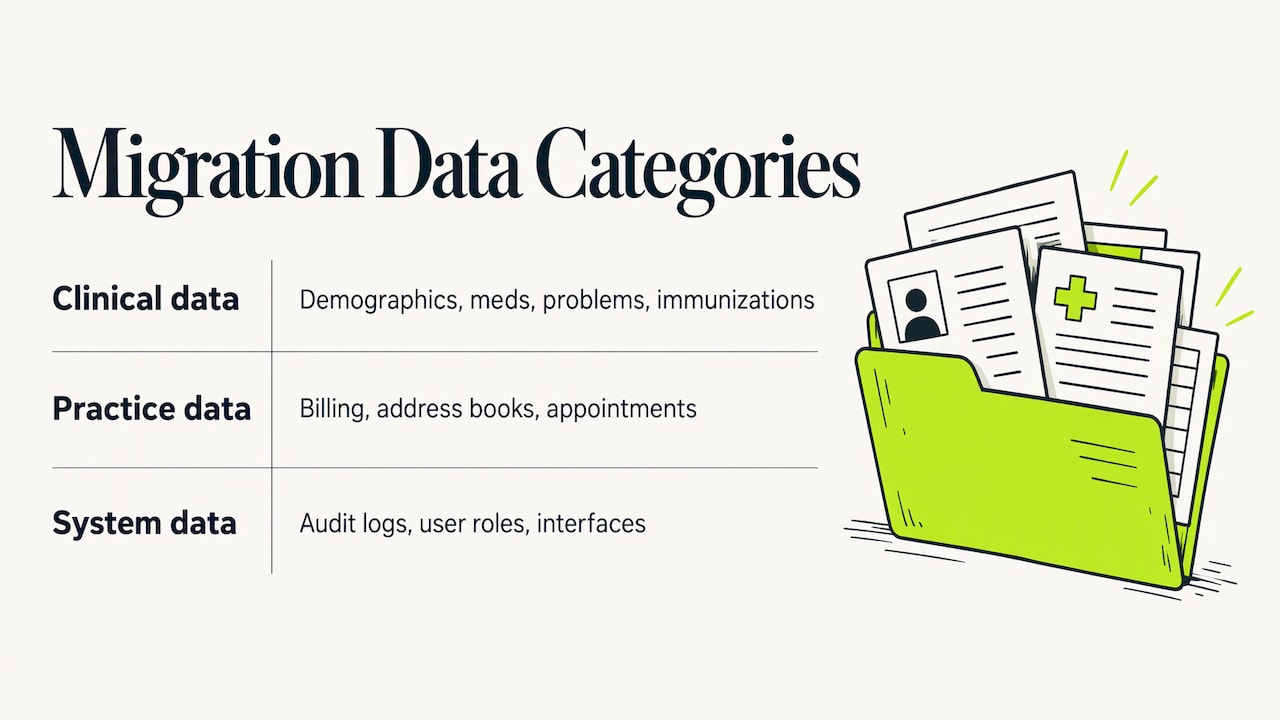
OntarioMD, a Canadian physician organization, groups migration data into three buckets: clinical data (demographics, medications, problem lists, family history, immunizations), practice data (billing, address books, appointments) and system data (audit logs, user roles, interfaces). It is a Canadian source, but the categories apply to any US clinic. An AHIMA journal article on existing patient records adds that practices must decide what to clean up, how far back to go and how long the transition will take, and should document policies on access, amendments, scanning, retention and destruction.
A scoping table for cash-pay clinics
| Data type | Typical approach | Why |
|---|---|---|
| Demographics and contact details | Migrate in full | Needed for scheduling, portal invitations and billing |
| Allergies, active medications, problem list | Migrate after cleaning | Safety-critical, so remove expired and duplicate entries first |
| Lab results and biomarker history | Migrate recent history as structured values, archive older PDFs | Trends drive longevity care plans |
| Clinical notes | Migrate recent notes, archive the rest as PDFs | Keeps the chart usable without bloating it |
| Care plans and protocols | Migrate active plans, archive closed ones | Active plans define current treatment |
| Intake and consent forms | Archive as documents, rebuild live forms in the new system | Signed originals must stay retrievable |
| Memberships and payment history | Rebuild from the billing platform, not the EHR | Payment data usually lives in the processor |
| Audit logs | Export and retain per your policy | Needed to show who accessed what and when |
When the old system also served as your billing tool, separate those records from the clinical ones. Your retention period depends on state law and your own policy, so confirm it with counsel before destroying anything. The EHR audit trail guide explains what audit logs record and why retention matters.
Clean before you move
Cleaning is cheaper before migration than after. OntarioMD advises resolving allergy status, expired medications and similar list items beforehand. In practice that means:
- Merge duplicate patient records and confirm the master patient list.
- Retire discontinued medications and inactive problems.
- Standardize lab names and units, for example one name for the same vitamin D test.
- Flag charts for deceased, transferred or inactive patients and decide whether they migrate or archive.
The case study above notes that scripted transfers depend on accurate master patient lists and on assigning proper codes to migrated clinical data. Duplicates and inconsistent names are where those transfers break.
The EHR data migration process, step by step
The sequence below follows the staged approach in OntarioMD's data migration guide, adapted for a US cash-pay clinic. Each step shows what it takes, where it tends to fail, and what the new system should carry for you.
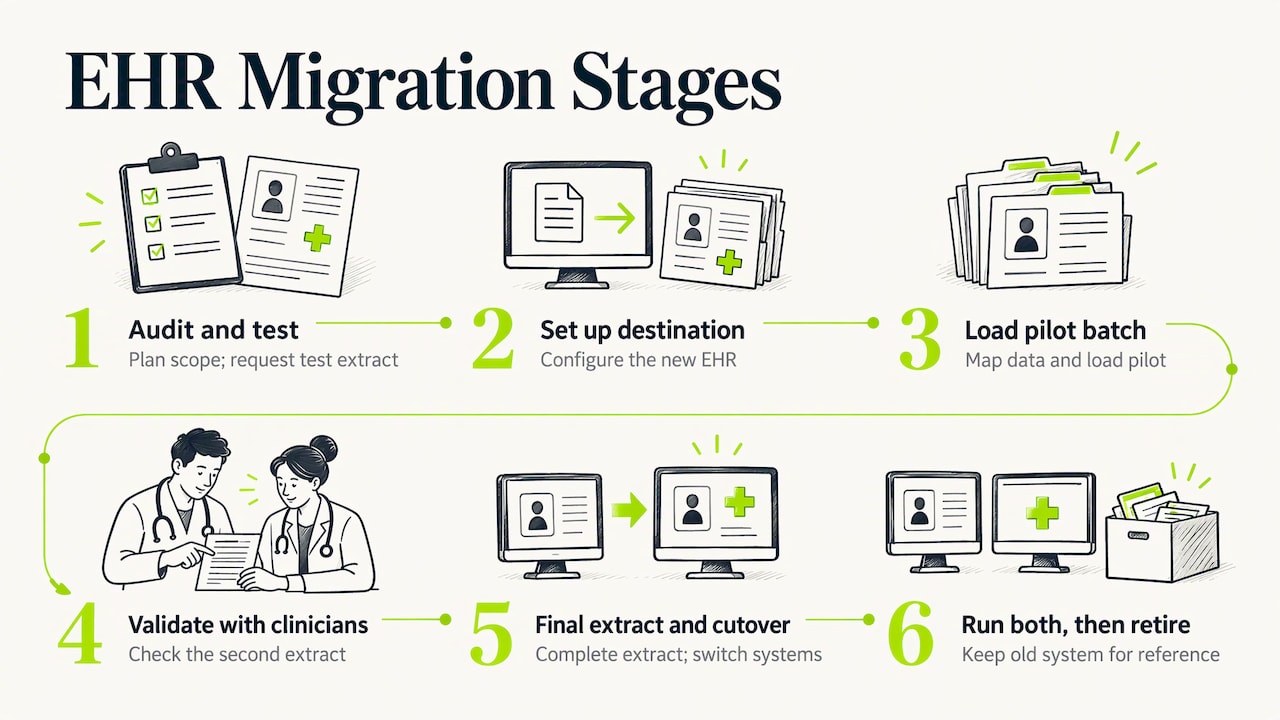
Step 1: Audit and plan
Inventory every data source: the old EHR, scanned documents, lab portals, spreadsheets, the membership billing tool, and any shared drives. Name an owner for each. Agree on a go-live date that avoids your busiest enrollment or lab-review weeks.
Where it goes wrong: undocumented sources. Clinics often discover late that biomarker trackers or protocol sheets live in spreadsheets no one listed.
OntarioMD advises planning well in advance and notifying the previous vendor early, since export requests can take time. Check your contract for export terms and fees before you give notice.
Step 2: Request a test extract
Ask the old vendor for a first extract and review it for completeness. Open it and confirm the fields you care about are present: lab dates, units, reference ranges, note authors, attachments.
Where it goes wrong: extracts that include a patient list and notes but not attached lab PDFs, or that flatten structured results into free text. Find this now, not at cutover.
Step 3: Set up the destination
Build the new environment before loading history. For a longevity clinic that means your biomarker ranges, care plan templates, note templates, intake forms, scheduling types and membership tiers. In LongevityEHR, the clinic's own biomarker ranges, care plans created from clinic templates, clinical notes, intake forms, scheduling with video visits, and memberships and payments through the clinic's own Stripe account are all configured by the clinic, so historical data lands in a structure that already reflects how you practice. The features page shows how these pieces fit together.
Where it goes wrong: loading data first and designing the structure afterward, which forces rework.
Step 4: Map and load a pilot batch
Map legacy fields to new ones and load a small pilot of complex charts, not simple ones. Include a patient with many labs, one on a long-running protocol and one with several providers.
For lab history, the question is whether numbers arrive as structured values or as documents. Where the old system holds lab reports as PDFs, LongevityEHR's AI lab extraction reads the report into the clinic's own biomarker ranges, and the provider reviews the result. That turns a folder of PDFs into trendable values without retyping, for the reports you decide are worth bringing across.
Step 5: Validate a second extract with clinicians
OntarioMD prescribes validating a second extract on a sample of 5 to 30 complex patients, with the old and new charts side by side, an issue log, and physician sign-off. Adopt the same discipline. Have the clinician who treats those patients compare medications, allergies, recent labs, active plans and last three notes, and log every discrepancy with an owner and a fix.
A practical test sequence, adapted from common practice:
- Pilot: 10 to 20 records, to catch mapping errors.
- Full-volume run: all in-scope data, to catch volume and performance problems.
- User acceptance test: clinicians and front-desk staff run a day of realistic work, including scheduling a video visit, filling an intake form and renewing a membership.
Close all defects that touch patient safety before cutover. Do not carry them into go-live.
Step 6: Final extract and cutover
OntarioMD recommends requesting the final full extract one to two weeks ahead of go-live, confirming that records are complete in the latest backup on cutoff day, and printing same-day appointment records. Have the vendor's trainer or your implementation contact available on the first day. A clean cutover sequence is backup, load, validation, then a stabilization period in which issues are triaged daily.
On go-live day, make sure the front desk has a tested path for the first live patient: scheduling, intake, payment and, for virtual patients, the video visit link. LongevityEHR's scheduling and telehealth and membership and payments tools are used for exactly these front-desk moments.
Step 7: Run both systems for reference, then retire the old one
After migration, keep the old system accessible for reference while staff cross-check data, as OntarioMD advises. Set a review date, for example 60 to 90 days, after which you finalize an archive and close the legacy account. Do not cancel the old subscription before you hold a complete, tested export you control.
Privacy, security and access rules that apply
A migration moves PHI, so HIPAA applies throughout. The points below are general information. Ask your counsel or compliance advisor to review your specific arrangement.
Sign a BAA before any PHI moves
The ONC guide EHR Contracts Untangled advises that a practice should have a written business associate agreement in place before disclosing PHI to an EHR vendor. It also cautions that vendors may claim rights to use data created in the EHR, including de-identified data, so read the data-rights clauses closely. LongevityEHR is HIPAA, with a BAA on request, and its security page describes its approach.
Confirm what happens to the old copy
OntarioMD's guidance, written for Ontario physicians under that province's privacy law, is that the physician remains responsible for PHI during migration. It advises obtaining a written statement that the previous vendor securely deleted PHI after transfer, or securely returned it, and keeping any required backups securely. The legal framework differs in the US, but the practice is sound: ask the outgoing vendor in writing what it will do with your data and when. For the US picture, the healthcare data privacy guide is written for cash-pay clinics.
Patient access continues during the move
The federal privacy and security guide for providers says covered entities generally must grant or deny access requests within 30 days, provide the requested electronic format when readily producible, and act on amendment requests within 60 days. A migration does not pause those clocks. Plan how requests received during cutover will be answered from whichever system holds the record.
Run a security risk analysis
The CMS specifications manual for the Medicare Promoting Interoperability Program describes a security risk analysis under the HIPAA Security Rule, 45 CFR 164.308(a)(1), upon installation or upgrade of a new system and at least annually. That program is aimed at hospitals, but the underlying Security Rule analysis applies to HIPAA-covered practices, and a new EHR is a natural trigger to refresh yours.
Information blocking and exports
Under the federal information blocking rules at 45 CFR Part 171, interfering with access, exchange or use of electronic health information can be a violation, though a security exception exists for practices tailored to a specific risk, applied consistently and based on a written security policy. If you are leaving a vendor, put your export request in writing and keep the response. Whether the rules apply to your clinic, and how, is a question for your counsel.
Evaluating migration software and services
Patient data migration tools range from vendor-run export services to integration engines that translate messages between systems. A few criteria matter for a small to mid-size clinic.
- Format and completeness: can the export include structured labs, notes, documents and audit logs, not only demographics?
- Mapping control: can your team review and correct how fields map before the full load?
- Error handling and recovery: the AHRQ HL7 integration engine evaluation template lists scalability, error handling, filtering and mapping, and backup and recovery among the points to assess.
- Validation method: for standards-based exchange, Carequality's FHIR implementation guide sets a concrete test: for each case, data is found, at least one resource is available and resources are retrieved.
- Contract terms: a BAA, clear data-ownership language and a defined end-of-contract export.
For a longevity practice, add two questions of your own. Will historical biomarkers arrive in a form that supports trend charts, and can your clinical team review them before patients see them? Those answers matter more to your care model than raw record counts.
Moving to a platform built for cash-pay longevity care
A migration costs the same effort whether you land in a general-purpose system or one designed around your model. The difference is what you do with the data afterward. LongevityEHR is a white-label EHR for cash-pay longevity, functional medicine, concierge and hormone clinics. It combines AI lab extraction into your own biomarker ranges, care plans from your templates, clinical notes, intake forms, scheduling with video visits, memberships and payments through your own Stripe account, and a branded patient portal. Pages on biomarker tracking, care plans and clinical notes show each piece in detail.
Pricing is published and per provider:
| Plan | Monthly | Billed annually |
|---|---|---|
| Trial | $0 for 15 days | Not applicable |
| Core | $99 per provider a month | $69.30 a month ($831.60 a year) |
| Scale | $199 per provider a month | $139.30 a month ($1,671.60 a year) |
| Enterprise | Custom pricing | Custom pricing |
Annual billing is 30% off, and every plan has unlimited patients. Full details are on the pricing page.
Start with the trial
The 15-day Trial plan is $0, which gives your clinical lead and front desk time to build your biomarker ranges, a care plan template and an intake form before you commit to a migration plan. LongevityEHR is built so clinics can launch their branded portal in days without custom development. To see it with your own templates, start from the pricing page.
Our perspective
Most migration advice is written as if records were the product. In a longevity clinic, the product is the trend line and the plan built from it. We would rather see a clinic move twelve months of well-structured biomarkers and its active protocols than ten years of unreadable attachments.
That is why we design LongevityEHR around the clinic's own ranges and templates. When a lab report is extracted into your ranges and a provider reviews it, the data you bring across starts working the day you go live. Care plans from your own templates mean the next visit looks like your practice, not like a generic chart.
Our advice is to scope narrowly, validate with the clinicians who will use the charts, and keep the old system available while the team builds confidence. A BAA on request, a clinic-branded portal, and memberships running through your own Stripe account let you restart the patient relationship cleanly rather than repair it.

Run your longevity clinic on one system
- AI lab extraction with provider review
- Your ranges, every result as a trend
- Memberships through your own Stripe
15-day free trial. BAA on request.
Sources
- Electronic Health Records, Health IT Playbook (ONC)
- Defining Data Migration Across Multidisciplinary Ambulatory Clinics (PMC)
- EMR Data Migration Guide (OntarioMD)
- EMR and Data Migration (OntarioMD)
- Managing Existing Patient Records in the Transition to EHRs (AHIMA)
- EHR Contracts Untangled (ONC)
- Privacy and Security Guide, Chapter 3 (HealthIT.gov)
- CMS Specifications Manual for the Promoting Interoperability Program, CY 2025
- 45 CFR Part 171, Information Blocking
- HL7 Integration Engine Vendor Evaluation Template (AHRQ)
- FHIR-Based Exchange Implementation Guide (Carequality)